Outer Space Doodle: Creative Possibilities for Every Project
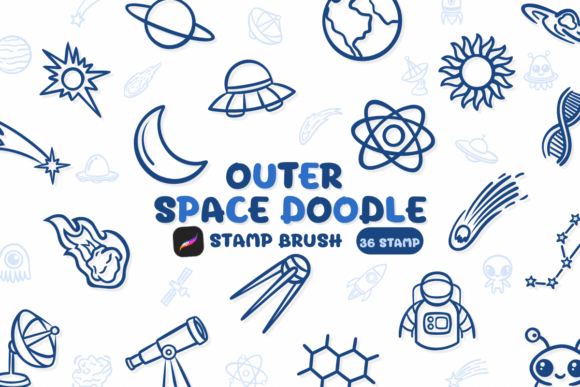
Outer Space Doodle is more than just a set of digital brushes—it’s a creative toolkit designed for artists, designers, and DIY enthusiasts who want to bring a touch of cosmic charm to their work. Built for use in Procreate, this collection of stamp brushes features a sketch-style outer space theme that’s both playful and versatile. Whether you’re designing a birthday card, crafting custom wedding stationery, or working on a branding project, Outer Space Doodle offers a unique way to elevate your visuals with minimal effort.
Real-World Uses for Outer Space Doodle
One of the standout features of Outer Space Doodle is its adaptability. While the theme centers around space—planets, stars, rockets, and UFOs—the applications extend far beyond astronomy-themed projects. For example, illustrators can use these brushes to quickly add whimsical backgrounds to character art or children’s book illustrations. The sketch-style aesthetic gives a hand-drawn feel that’s both modern and nostalgic.
Wedding planners and invitation designers have also found creative ways to incorporate Outer Space Doodle into their work. Imagine a space-themed engagement party invitation with a subtle star cluster stamped in the corner, or a minimalist rocket graphic used as a design accent. These small touches can make a big difference in setting the tone and personality of the event.
DIY crafters love using Outer Space Doodle for handmade cards, scrapbooks, and personalized gifts. The brush set allows for quick, repeatable elements that look professional without requiring advanced illustration skills. Whether you're creating a birthday card for a space-obsessed kid or designing a custom sticker pack for a home office, these brushes offer flexibility and charm.
Industries and Audiences That Benefit Most
Outer Space Doodle appeals to a wide range of creative professionals and hobbyists. Graphic designers working on branding for niche markets—like science communication, gaming, or youth education—can integrate these brushes into logos, social media templates, and promotional materials. The casual sketch style adds a friendly, approachable vibe that’s perfect for brands aiming to connect with younger audiences or those who appreciate retro-futuristic aesthetics.
Teachers and educators also find value in using Outer Space Doodle for classroom materials. From printable worksheets to bulletin board decorations, the brushes allow for engaging visuals that capture students’ imaginations. A simple background filled with stars or planets can transform a basic handout into something visually stimulating without taking away from the educational content.
Content creators and influencers who focus on lifestyle, art tutorials, or stationery hauls often incorporate Outer Space Doodle into their digital content. These brushes help them create branded graphics, thumbnails, or even printable downloads for their followers. The ease of use within Procreate makes it a favorite among creators who want to maintain a consistent visual identity without spending hours on design details.
How to Choose and Use Outer Space Doodle Effectively
Before diving into your next project with Outer Space Doodle, it’s helpful to consider how the brushes will integrate with your existing workflow. Since they’re designed for Procreate, users should have a basic understanding of the app’s brush library and stamping features. The brushes work best when layered with other textures or used as accents rather than the main focus of a design.
When choosing which brushes to use, consider the overall tone of your project. Some brushes in the set are more detailed—like the rocket or satellite graphics—while others offer simple, repeatable patterns such as constellations or meteor trails. Mixing and matching these elements can help you create depth and visual interest without overwhelming the composition.
Another important consideration is color. While the brushes are designed for sketch-style visuals, they can be recolored or blended with other layers to match any palette. This flexibility makes them especially useful for multi-purpose designs, like logos that need to work in both color and black-and-white formats.
Strengths and Limitations of Outer Space Doodle
One of the major strengths of Outer Space Doodle is its ease of integration into digital workflows. Because it’s built as a Procreate stamp brush set, there’s no need to import or resize individual graphics. This saves time and ensures consistency across multiple design pieces. Additionally, the sketch aesthetic makes the graphics feel organic and hand-crafted, which is highly desirable in today’s design trends.
However, like any creative tool, Outer Space Doodle has its limitations. It’s specifically tailored for digital artists using Procreate, so users working in other platforms may need to find alternative methods to replicate the same look. Also, while the space theme is broad, it may not be suitable for every project. Those looking for more realistic or photorealistic space imagery may find the doodle style too whimsical for their needs.
Another consideration is file size and performance. While the brushes are optimized for Procreate, using multiple stamp layers in a single canvas can affect the app’s responsiveness, especially on older devices. Designers working on complex illustrations should be mindful of layer management to maintain a smooth workflow.
Who Should Consider Outer Space Doodle?
Outer Space Doodle is ideal for creatives who want to add a touch of interstellar charm to their work without sacrificing time or quality. Whether you’re a professional designer looking for a shortcut to intricate illustrations or a hobbyist wanting to experiment with themed graphics, this brush set offers a practical and fun solution.
It’s especially useful for those who work on themed projects—like sci-fi book covers, space-themed branding, or educational materials. The flexibility of the brushes allows them to be used across different industries, making them a worthwhile investment for anyone who values creative efficiency.